JavaScript Array Methods Explained
map, filter, reduce explained simply

In our previous article, we explored JavaScript Arrays 101. We learned how to create arrays, access data using indexes, and iterate with loops.
Now that we can store collections of data, the next step is learning how to manipulate them efficiently.
This is where Array Methods come in.
PART 1 - Why Array Methods Exist
Imagine you are building a small coding project tracker. You have a list of tasks stored in an array
let projectTasks = ["Setup project", "Design UI", "Implement login", "Connect database"];
As a user interacts with your application, you will need to perform various operations on this data. You might want to:
Add new tasks when the project scope expands.
Remove completed tasks from the list.
Update the titles of specific tasks.
Extract a smaller list of tasks that are marked as urgent.
Calculate the total number of hours spent on all tasks combined.
If we only use the basic traditional for loop we learned previously, writing the logic for all these operations becomes incredibly repetitive. You would find yourself writing the same bulky loop structures over and over again, making your code harder to read and maintain.
The Solution: Built-In Methods
JavaScript recognizes that developers perform these actions constantly. To help us, JavaScript provides built-in methods , pre-written functions attached directly to every array we create.
Instead of writing a manual loop and telling the computer exactly how to iterate through the data step-by-step, array methods allow us to focus on what we want to achieve. This shift in thinking is known as working with data transformations instead of manually iterating everything.
Let's dive into the core array methods you will use every day.
PART 2 - Core Array Methods
push()
The Problem: The project is growing, and your manager just assigned you a new task: "Deploy to production". You need to add this task to the end of your tracker.
The Array Method: The push() method adds one or more elements to the absolute end of an array.
Syntax and Code:
let projectTasks = ["Setup project", "Design UI"];

// IMPORTANT: push() returns the NEW LENGTH of the array, not the added element

let newTotal = projectTasks.push("Deploy to production");

console.log('New Total ', newTotal); // 3

console.log('All Tasks', projectTasks);

//  ['Setup project', 'Design UI', 'Deploy to production']
Step-by-Step Execution:
When push() runs, JavaScript looks at the current length of the array. It navigates to the very next available index at the end, inserts the new element there, and then updates the array's internal length tracker.
Before -> After State:
Before:
["Setup project", "Design UI"]After:
["Setup project", "Design UI", "Deploy to production"]
Return Value:
The push() method returns a number: the new length of the array. In the code above, newTotal would hold the value 3.
pop()
The Problem: You realize the last task you added to your tracker was a duplicate. You need to remove the most recently added task from the end of the list.
The Array Method: The pop() method removes the very last element from an array.
Syntax and Code:
let projectTasks = ["Setup project", "Design UI", "Deploy to production"];

let removedTask = projectTasks.pop();
Step-by-Step Execution:
JavaScript identifies the last index of the array, extracts the value stored there, deletes that slot, and decreases the array's length by one.
Before -> After State:
Before:
["Setup project", "Design UI", "Deploy to production"]After:
["Setup project", "Design UI"]
Return Value:
The pop() method returns the actual element that was removed. In this case, removedTask holds the string "Deploy to production".
shift()
The Problem: You are building a music player. When a song finishes playing, you need to remove the first song from the playlist queue so the next song can play.
The Array Method: The shift() method removes the first element (index 0) from an array.
Syntax and Code:
let playlistQueue = ["Song A", "Song B", "Song C"];

let playedSong = playlistQueue.shift();
Step-by-Step Execution:
JavaScript removes the element at index 0. Because an array must maintain a continuous sequence starting from 0, JavaScript then shifts all the remaining elements forward. The item that was at index 1 moves to index 0, index 2 moves to 1, and so on.
Before -> After State:
Before:
["Song A", "Song B", "Song C"]After:
["Song B", "Song C"]
Return Value:
Like pop(), shift() returns the element that was removed. Here, playedSong holds "Song A".
unshift()
The Problem: A critical bug was found in your app. You need to add a "Fix login bug" task to the absolute beginning of your task list so it gets handled immediately.
The Array Method: The unshift() method adds one or more elements to the beginning of an array.
Syntax and Code:
let projectTasks = ["Design UI", "Connect database"];

let newCount = projectTasks.unshift("Fix login bug");
Step-by-Step Execution:
JavaScript makes room at the front of the array by shifting all existing elements backward (index 0 becomes 1, index 1 becomes 2). It then inserts the new element into the newly opened index 0 slot.
Before -> After State:
Before:
["Design UI", "Connect database"]After:
["Fix login bug", "Design UI", "Connect database"]
Return Value:
Like push(), unshift() returns the new length of the array. Here, newCount would be 3.
forEach()
The Problem: You want to print out every exercise in your gym workout log to the screen, one by one.
Traditional Loop Solution:
let workoutLog = ["Squats", "Bench Press", "Deadlifts"];

for (let i = 0; i < workoutLog.length; i++) {
  console.log(`Exercise: ${workoutLog[i]}`);
}
The Array Method: The forEach() method provides a cleaner way to run a specific operation for each element inside an array without managing a manual counter variable (i).
Syntax and Code:
let workoutLog = ["Squats", "Bench Press", "Deadlifts"];

workoutLog.forEach((exercise, index) => {
  console.log(`Exercise \({index + 1}: \){exercise}`);
});

// Exercise 1: Squats
// Exercise 2: Bench Press
// Exercise 3: Deadlifts
Step-by-Step Execution:
JavaScript takes the function you provide and runs it once for every item in the array. It automatically passes important data into your function parameters:
element (
exercise): The current item being processed.index (
index): The numeric position of the item.array (optional): The full array being traversed.
Return Value:
forEach() always returns undefined. Its only purpose is to perform an action, not to create new data.
map()
The Problem: You have an array of student exam scores out of 50. The teacher decides to apply a curve and double every score to make them percentages out of 100.
The Array Method: The map() method transforms each element in an array using a rule you provide, and places the transformed elements into a brand new array.
Syntax and Code:
let rawScores = [40, 32, 45, 28];

let percentageScores = rawScores.map((score) => {
  return score * 2;
});

console.log(percentageScores); // [80, 64, 90, 56]
Step-by-Step Execution:
JavaScript loops through rawScores. For the first item (40), it multiplies it by 2 to get 80. It pushes 80 into a hidden new array. It repeats this for every item. Crucially, the original array remains completely unchanged.
Conceptual Diagram
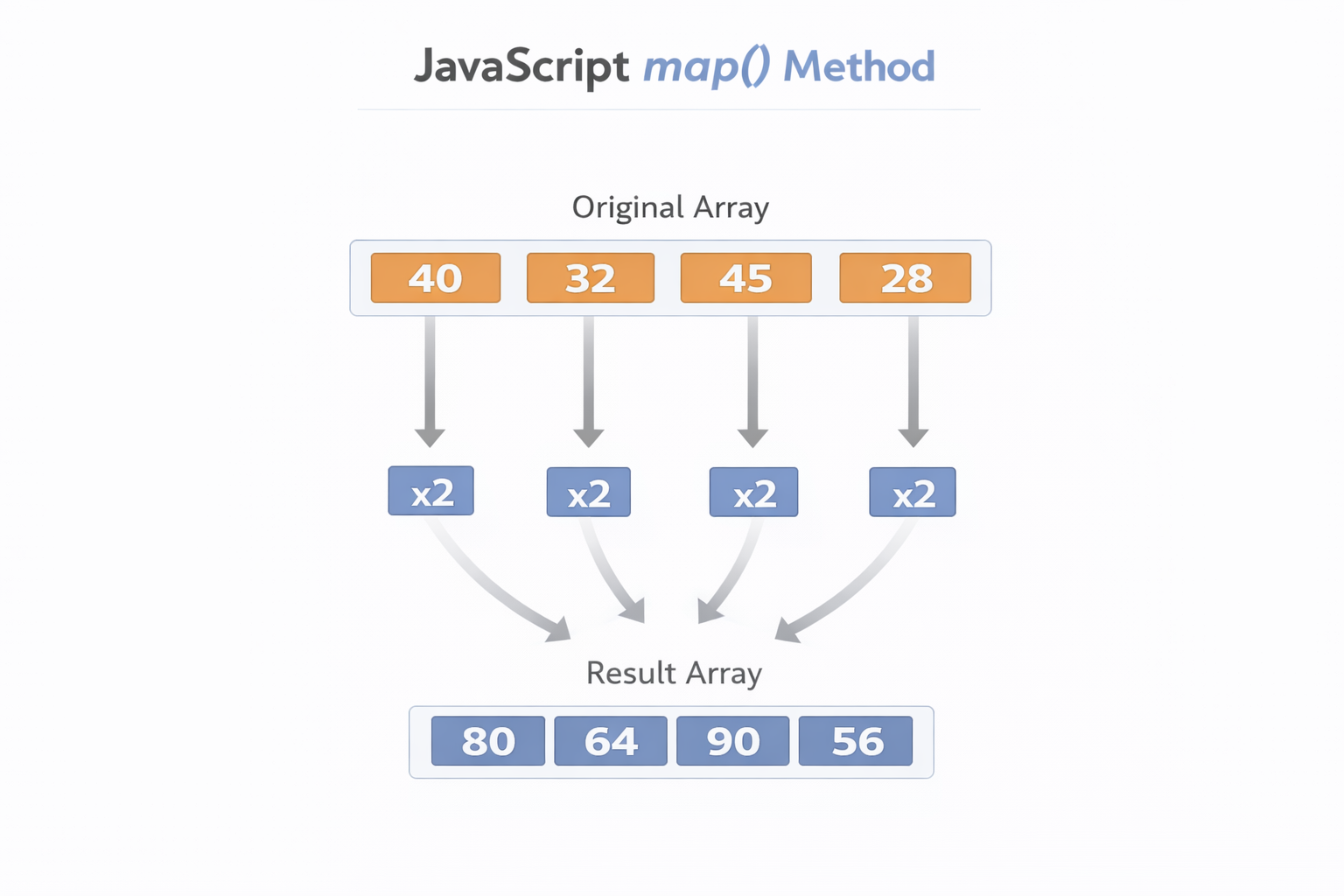
Original Array:   [ 40,   32,   45,   28 ]
                    ↓     ↓     ↓     ↓
Transformation:   (x2)  (x2)  (x2)  (x2)
                    ↓     ↓     ↓     ↓
New Array:        [ 80,   64,   90,   56 ]
Return Value:
map() returns a new array containing the transformed elements.
filter()
The Problem: Out of a list of student percentages, you want to extract a list of only the students who passed the exam (scored 50 or higher).
The Array Method: The filter() method tests every element against a specific condition. It selects only the elements that pass the test and creates a new array with them.
Syntax and Code:
let finalScores = [80, 45, 90, 33, 60];

let passingScores = finalScores.filter((score) => {
  return score >= 50;
});

console.log(passingScores); // [80, 90, 60]
Step-by-Step Execution:
JavaScript tests the first element (80). Is 80 >= 50? Yes (true). It keeps 80 in the new array. It tests the next element (45). Is 45 >= 50? No (false). It skips 45. It continues until the end.
Conceptual Diagram:
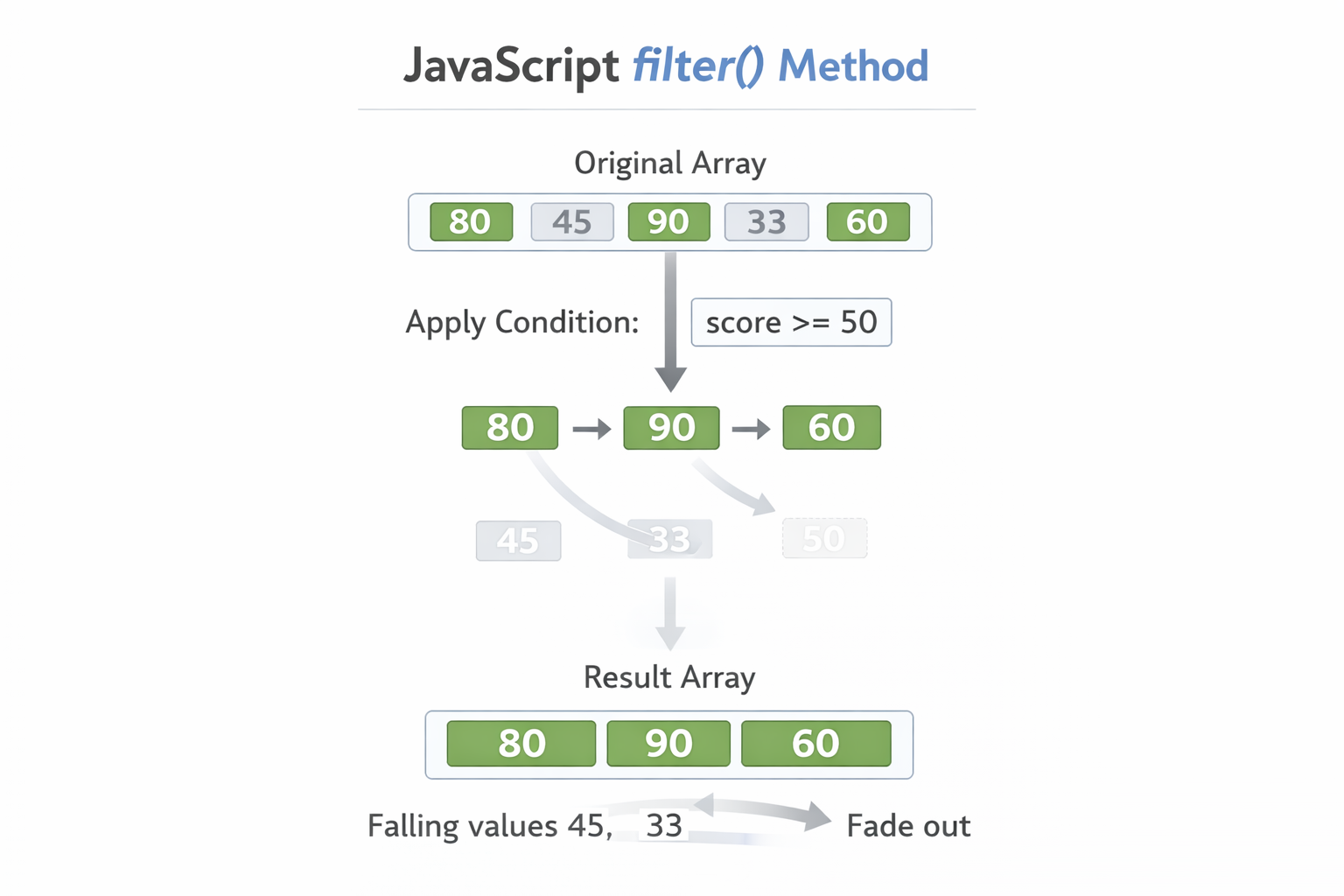
Element →  Condition (>= 50)  →  Keep or Skip
  80    →       True          →      Keep
  45    →       False         →      Skip
  90    →       True          →      Keep
  33    →       False         →      Skip
  60    →       True          →      Keep
Return Value:
filter() returns a new array containing only the elements that resulted in a true condition. (Here: [80, 90, 60]).
reduce()
The Problem: You are building an ecommerce cart. You have an array of item prices, and you need to calculate the total checkout price.
The Array Method: The reduce() method takes an array of multiple values and "reduces" them down into a single combined result.
Syntax and Code:
let cartPrices = [10, 20, 30];

let totalPrice = cartPrices.reduce((accumulator, currentValue) => {
  return accumulator + currentValue;
}, 0);
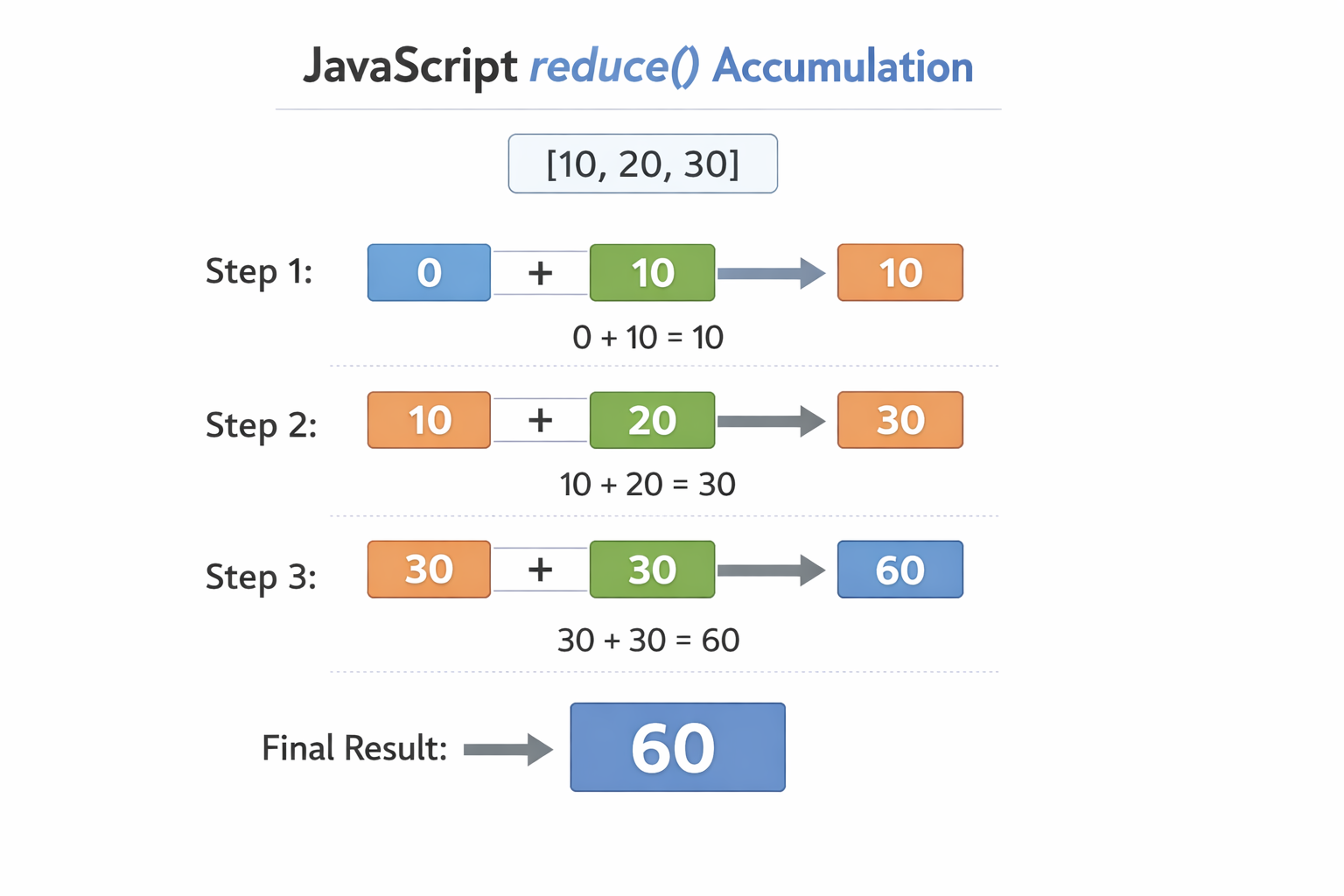
Step-by-Step Execution:
reduce relies on two main concepts:
Accumulator: The running total (think of it as a snowball growing in size). The
0at the end of our code tells the accumulator to start at zero.Current Value: The current array item being added to the snowball.
JavaScript starts the accumulator at 0. It takes the first currentValue (10) and adds it. The new running total is 10. It then adds the next value (20), making the total 30.
Conceptual Table:
Step | Accumulator | Current Value | Result (Next Accumulator) |
1 |
|
|
|
2 |
|
|
|
3 |
|
|
|
Return Value
reduce() returns a single value (in this case, the number 60).
PART 3 - Mental Models
To become a strong JavaScript developer, you need to know when to reach for which tool. Keep this mental model handy:
Array Method | Primary Purpose | Does it modify the original array? | Return Value |
| Perform an action (like printing) | No |
|
| Transform data (like math operations) | No | A new array |
| Select data (based on rules) | No | A new array |
| Combine values (like a total sum) | No | A single value |
COMMON MISTAKES
When first learning these methods, watch out for these common traps:
Expecting
mapto modify the original array:map()does not touch your original array. If you forget to store its return value in a new variable (let newArr = arr.map(...)), your transformed data vanishes into thin air.Forgetting
filterreturns a new array: Even if your filter condition only finds one match, it still returns an array containing that one item (e.g.,[80]), not the item itself.Misunderstanding
reduceparameters: Forgetting to pass the initial starting value (like the0in our cart example) can lead to bizarre mathematical bugs, especially if your array ends up being empty.Using
forEachwhen a transformation is required: Beginners often useforEachto manually push updated items into an empty array. If your goal is to transform data into a new array,map()is the correct and cleaner tool for the job.
PRACTICE & EXPERIMENT
It is time to build muscle memory. Open your browser console (Right-click -> Inspect -> Console) and try these exercises
Create an array of numbers representing daily studying minutes:
let studyMinutes = [30, 45, 15, 60, 20];
Use map() to double each number (imagine studying twice as hard today!):
let doubledStudy = studyMinutes.map(minutes => minutes * 2);

console.log("Doubled:", doubledStudy);
// Output: [60, 90, 30, 120, 40]
Explanation: We passed an arrow function into map() that multiplies each element by 2, returning a brand new array.
Use filter() to get numbers greater than 25
let deepWorkSessions = studyMinutes.filter(minutes => minutes > 25);

console.log("Deep Work:", deepWorkSessions);
// Output: [30, 45, 60]
Explanation: filter() tested each value. 15 and 20 failed the > 25 test, so they were skipped.
Use reduce() to calculate total sum:
let totalStudyTime = studyMinutes.reduce((total, minutes) => total + minutes, 0);
console.log("Total Time:", totalStudyTime);
// Output: 170
Explanation: We started our total accumulator at 0 and continuously added each session's minutes to it until we had a single final number.
SUMMARY
Array methods are essential tools in modern JavaScript. They allow us to move away from bulky, manual loops and write code that is descriptive and elegant.
push,pop,shift, andunshiftare your go-to tools for adding and removing individual pieces of data.forEachis perfect for simply executing an action on every item.map,filter, andreduceare the golden trio of data transformation, allowing you to create new arrays and combined values without destroying your original data.Some array methods modify the original array (push, pop, shift, unshift), while others create new arrays without changing the original (map, filter, reduce).
Arrays help us store ordered collections of data.
But what if we want to represent structured information like users, products, or configurations?
In the next article, we will explore Objects in JavaScript and how they power real applications.


